20 Viral Nano Banana AI Prompts You Can Copy & Paste (2026 Edition)
Copy and paste these 20 trending Nano Banana prompts to create viral AI art instantly. From Funko Pops to Ghibli scenes, plush toys to game UI — all prompts tested and ready to use.
Stop spending hours crafting the perfect prompt. We've compiled 20 battle-tested prompts that are going viral right now — just copy, paste, and watch the magic happen.
These prompts work perfectly with Nano Banana, delivering professional results in seconds. Each one has been tested across thousands of generations, refined for consistency, and optimized for that scroll-stopping quality everyone's chasing.
In this guide:
- 20 ready-to-use prompts (just copy & paste)
- Real example images for each style
- Pro tips for customization
- Best use cases for every prompt
Let's jump in.
The Secret to Viral AI Art
Before we dive into the prompts, here's what makes them work:
- Specific details beat vague descriptions
- Visual references (lighting, materials, textures) improve output
- Clear composition directions help AI understand your vision
- Quality markers like "high-quality" or "photorealistic" matter
Now, let's get to the good stuff.
1. Ghibli Style Magic
The simplest prompt that delivers incredible results. Turn any photo into a Studio Ghibli masterpiece.
Copy this:
Redraw this photo in Ghibli style
Why it works: The AI knows exactly what Ghibli aesthetic means — soft watercolors, dreamy atmospheres, and that distinctive animated charm. No need to over-explain.
Best for: Profile pictures, fan art, gift images, social media content
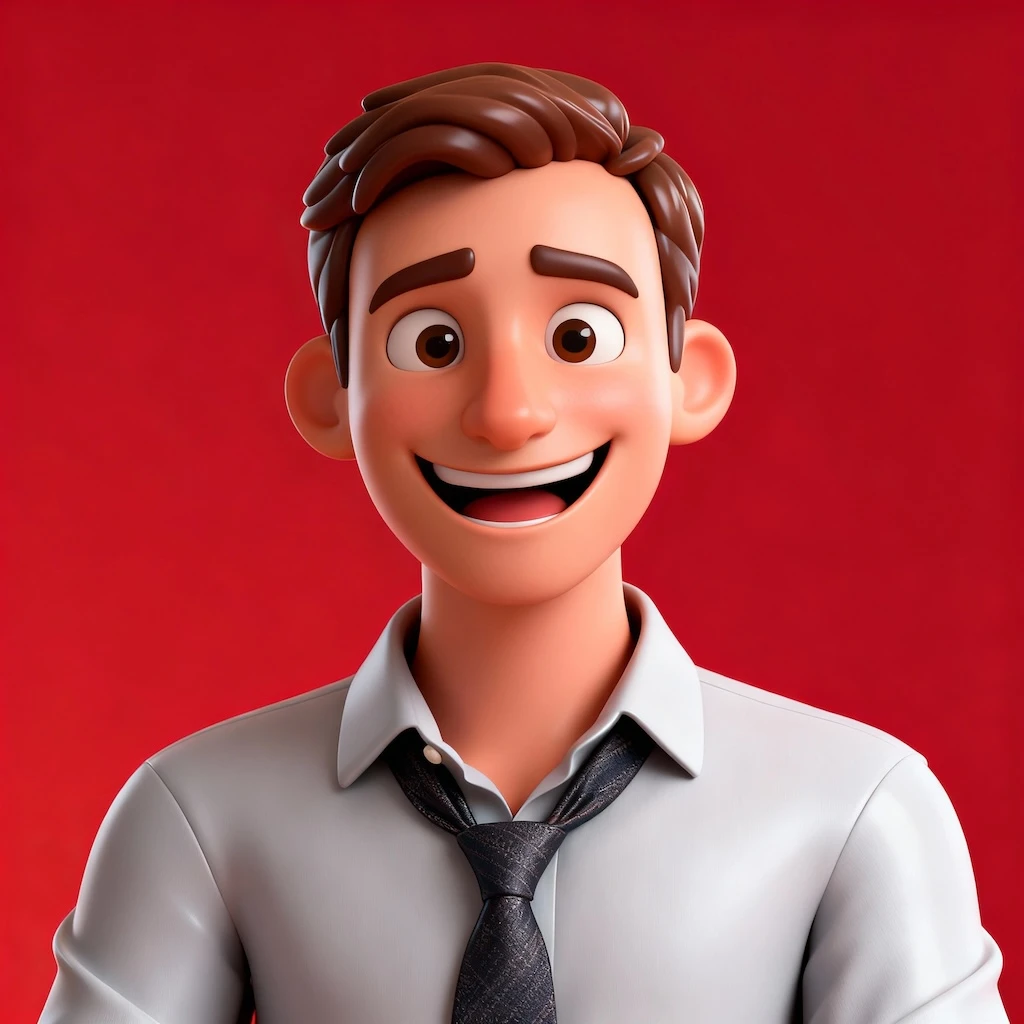
2. Funko Pop Figure
Transform anyone into a collectible Funko Pop figure with that iconic oversized head and adorable chibi body.
Copy this:
Create a detailed 3D render of a chibi Funko Pop figure, strictly based on the provided reference photo. The figure should accurately reflect the person's appearance, hairstyle, attire, and characteristic style from the photo. High detail, studio lighting, photorealistic texture, pure white background.
Best for: Personalized gifts, social media avatars, fan merchandise mockups
3. Cozy Knitted Doll
Create heartwarming yarn doll versions of anyone. This prompt captures that handmade, artisan quality perfectly.
Copy this:
A close-up, professionally composed photograph showcasing a hand-crocheted yarn doll gently cradled by two hands. The doll has a rounded shape, featuring the cute chibi image of the character in the uploaded image, with vivid contrasting colors and rich details. The hands holding the doll are natural and gentle, with clearly visible finger postures, and natural skin texture and light/shadow transitions, conveying a warm and realistic touch. The background is slightly blurred, depicting an indoor environment with a warm wooden tabletop and natural light streaming in from a window, creating a comfortable and intimate atmosphere. The overall image conveys a sense of exquisite craftsmanship and cherished warmth.
Best for: Gift concepts, craft inspiration, kawaii content, Etsy shop mockups
4. iPhone Selfie Generator
Create natural-looking, slightly imperfect selfies that feel authentically human — complete with motion blur and awkward angles.
Copy this:
Please draw an extremely ordinary and unremarkable iPhone selfie, with no clear subject or sense of composition — just like a random snapshot taken casually. The photo should include slight motion blur, with uneven lighting caused by sunlight or indoor lights resulting in mild overexposure. The angle is awkward, the composition is messy, and the overall aesthetic is deliberately plain — as if it was accidentally taken while pulling the phone out of a pocket.
Why it works: Sometimes "too perfect" feels fake. This prompt nails that candid, unfiltered vibe that resonates on social media.
Best for: Realistic social media content, authentic-looking posts, meme creation
5. Collectible Capsule Toy
Reimagine anyone as a miniature gashapon (capsule toy) figure with dramatic poses and premium collectible aesthetics.
Copy this:
A detailed transparent gashapon capsule diorama, held between fingers, featuring the person in the photo in their signature pose or style. Inside: detailed figure showing their look, clothing, and accessories, with relevant background elements matching their theme. Lighting should be dramatic and cinematic. The capsule has a transparent top and a colored base, decorated with thematic motifs. The base is labeled with their name in a matching font style. The design should look like a miniature collectible, with photorealistic detail, soft bokeh, and a square 1080x1080 composition.
Best for: Personalized collectibles, influencer content, unique profile images
6. Soft Plush Toy Version
Transform characters or people into adorable, huggable plush toys with embroidered details.
Copy this:
A soft, high-quality plush toy of the character in the image, with an oversized head, small body, and stubby limbs. Made of fuzzy fabric with visible stitching and embroidered facial features. The plush is shown sitting or standing against a neutral background. The expression is cute or expressive, and it wears simple clothes or iconic accessories if relevant. Lighting is soft and even, with a realistic, collectible plush look. Centered, full-body view. 1080x1080.
Best for: Merchandise concepts, children's content, gift ideas, kawaii aesthetics
7. Emoji Sticker Pack
Generate a complete sticker set with multiple expressive poses and emotions — perfect for messaging apps.
Copy this:
Create a sticker pack of the character showing: making a playful peace sign with both hands and winking; tearful eyes and slightly trembling lips showing a cute crying expression; arms wide open in a warm enthusiastic hug pose; lying on their side asleep resting on a tiny pillow with a sweet smile; pointing forward with confidence surrounded by shining visual effects; blowing a kiss with heart symbols floating around. Maintain chibi aesthetic with exaggerated expressive big eyes and soft facial lines. Background: vibrant red with star or colorful confetti elements for decoration. Leave some clean white space around each sticker. Aspect ratio: 9:16
Best for: Personal sticker packs, messaging apps, social media reactions, meme content
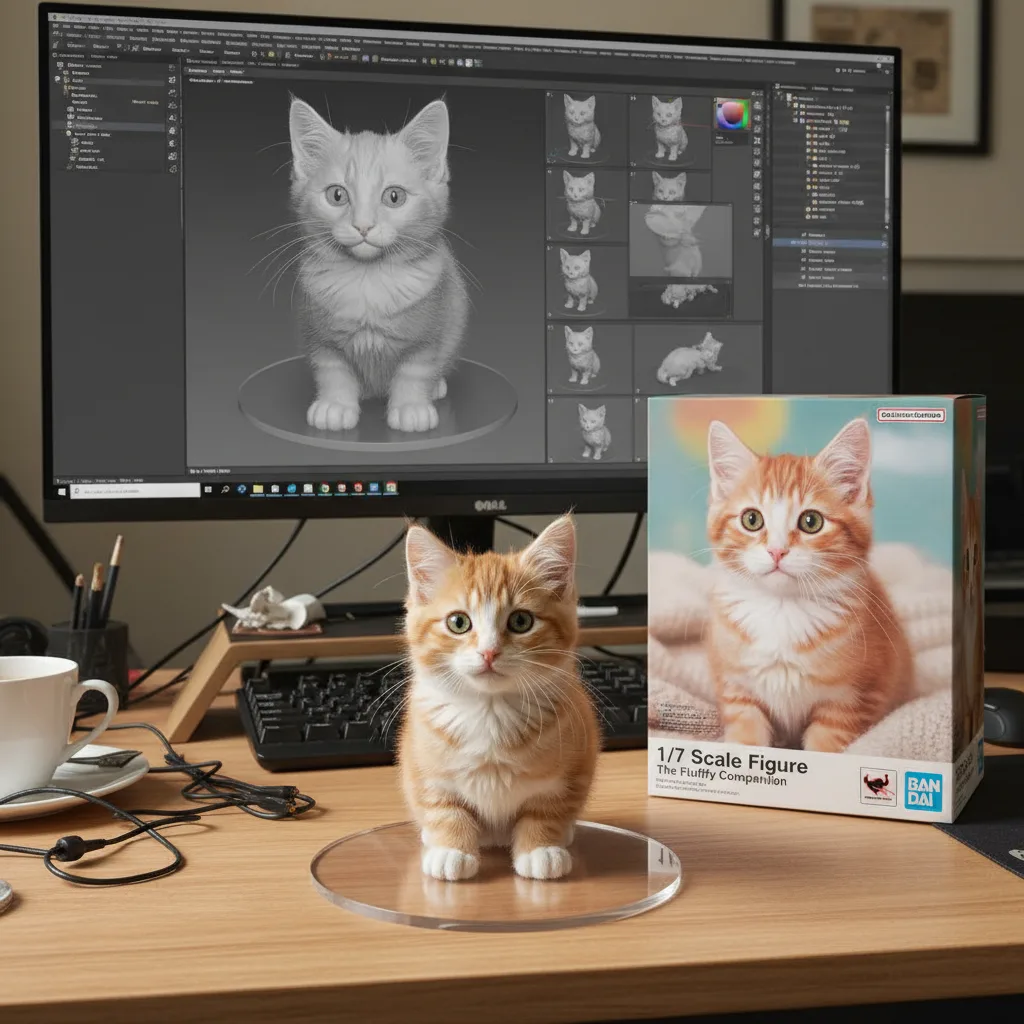
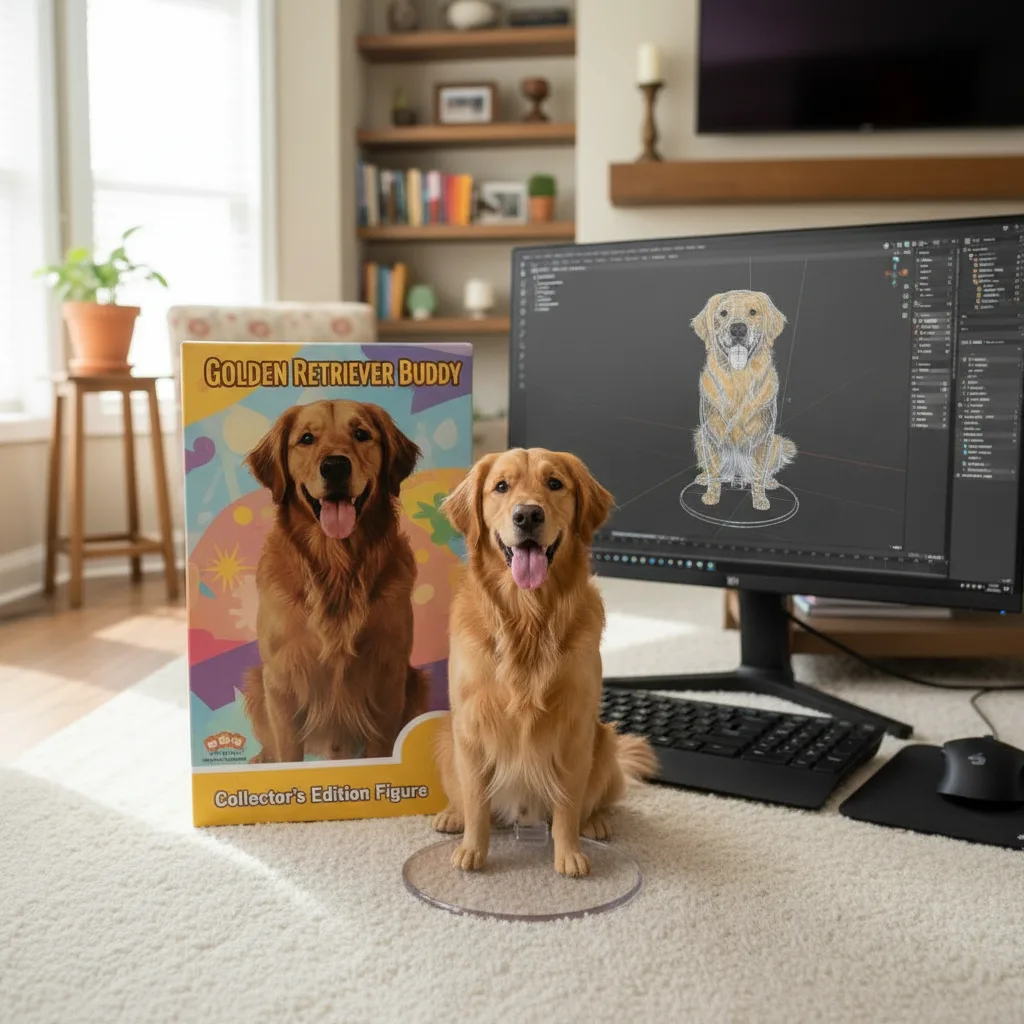
8. 3D Action Figure Display
Create museum-quality action figure renders with professional packaging and display setup.
Copy this:
Create a 1/7 scale commercialized figure of the character in the image, in a realistic style and environment. Place the figure on a computer desk, using a circular transparent acrylic base without any text. On the computer screen, display the ZBrush modeling process of the figure. Next to the computer screen, place a BANDAI-style toy packaging box printed with the original artwork.
Best for: Fan art, collectible mockups, content creator merchandise, figure design concepts
9. Rhythm Game Screenshot
Transform photos into arcade-style rhythm game interfaces with dynamic character designs and immersive HUD elements.
Copy this:
A vibrant rhythm dance game screenshot featuring three same 3D animated characters from the reference photo, keeping unique hairstyle, accessories, and confident dance pose. Immersive cinematic lighting with neon pink and purple glow, glossy reflective dance floor shining under spotlights, dynamic 3D cartoon style. Rhythm game interface with immersive UI: score meter at the top, colorful music waveform animations synced to the beat, stage timer countdown, and floating combo numbers. Highly detailed, game-like atmosphere with energy bars, neon particle effects, and immersive arcade rhythm game HUD elements. Ultra-detailed, cinematic, immersive, 3D animation.
Best for: Gaming content, Twitch streamers, music-themed projects, creative portfolios
10. Seamless Image Fusion
Blend multiple photos into one cohesive composition with natural lighting and consistent perspective.
Copy this:
Combine the uploaded images into a single cohesive image. Keep all key subjects recognizable and maintain their proportions and details. Blend the images naturally with consistent lighting, shadows, perspective, and style. Photorealistic, high-resolution, seamless integration.
Pro tip: This works best when your source images have similar lighting conditions.
Best for: Group photos, creative compositions, family portraits, event photos
11. Artistic Style Transfer
Apply one image's artistic style to another while preserving the original subject.
Copy this:
Transform the first image into the artistic style of the second image. Keep the main subject, composition, and details from the first image, but apply the colors, textures, and overall aesthetic of the second image. High-quality, illustration style, consistent details.
Best for: Artistic experiments, unique portraits, creative remixes
12. Virtual Outfit Swap
Change clothing in photos without altering identity, pose, or proportions.
Copy this:
Keep the character in the first image unchanged, but replace their outfit with the clothing from the second image. Maintain the same pose, body proportions, and facial features, while applying the color, texture, and style of the outfit. High-quality, realistic, consistent detail.
Best for: Fashion visualization, outfit planning, e-commerce previews, costume concepts
13. Expression Controller
Adjust facial expressions while keeping everything else perfectly intact.
Copy this:
Keep the person from the image unchanged, but change their facial expression to [smiling/surprised/serious/laughing]. Preserve the pose, body proportions, hairstyle, and overall appearance. Maintain realistic lighting, shadows, and photorealistic details.
Replace the bracketed text with your desired expression.
Best for: Headshot variations, emotion studies, social media content
14. Dynamic Pose Swap
Transfer people into completely new body positions while maintaining their identity.
Copy this:
Place the person in the image into the exact pose shown in the reference. Preserve their identity, body proportions, and clothing details. Ensure the pose is natural and realistic, with consistent lighting, shadows, and perspective. Photorealistic, high-resolution result.
Best for: Creative portraits, action shots, dynamic social media content
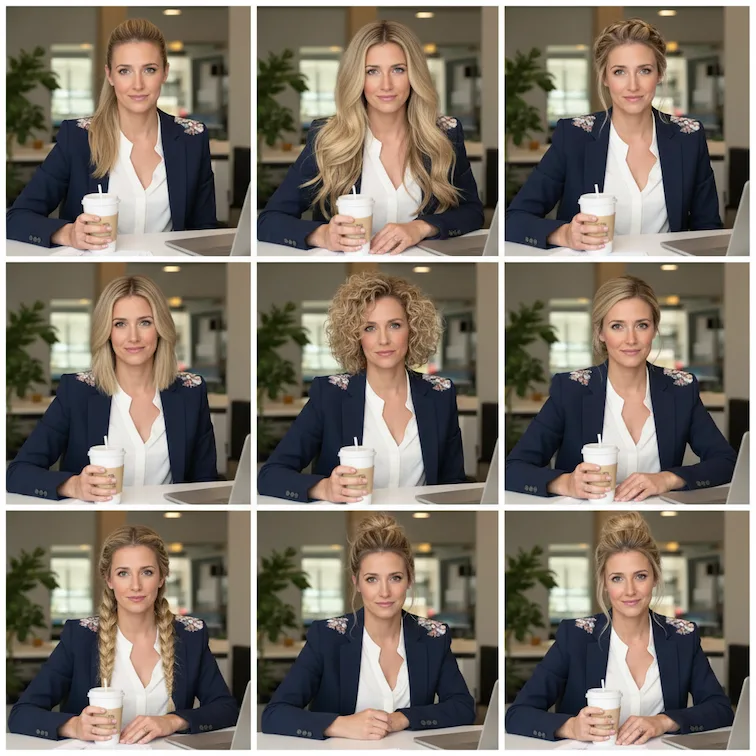
15. 9-Panel Portrait Grid
Showcase multiple portrait variations in a single, shareable image.
Copy this:
Using the uploaded photo as a reference, generate a set of 9 vibrant half-length portraits featuring natural life. Each portrait should show a different pose and be placed in a unique setting, with rich, colorful details that highlight diversity and personality.
Best for: Model portfolios, dating profiles, social media engagement posts
16. Background Swap
Replace any photo's backdrop while keeping subjects perfectly integrated.
Copy this:
Replace the background of the image with [describe new background: a tropical beach / a modern office / a cherry blossom garden / etc.]. Keep the main subject unchanged, maintaining original proportions, lighting, and details. Ensure the subject blends naturally with the new environment. Photorealistic, high-resolution, seamless integration.
Best for: Real estate marketing, travel content, professional headshots, product photography
17. Smart Object Addition
Add new elements to existing images with natural blending.
Copy this:
Add [describe element: a golden retriever / a vintage lamp / a coffee cup] to the image. Place it naturally in the scene, matching the lighting, perspective, and style. Keep the original elements unchanged. Photorealistic, seamless integration.
Best for: Scene enhancement, creative storytelling, product placement mockups
18. Clean Object Removal
Remove unwanted elements while maintaining scene continuity.
Copy this:
Remove [describe element: the person on the left / the car in the background / the sign] from the image. Fill the background naturally to maintain the scene's continuity, lighting, and details. Keep all other elements unchanged. Photorealistic, high-resolution.
Best for: Photo cleanup, real estate photography, professional retouching
19. Multi-Angle Portrait
Generate the same subject from multiple camera perspectives.
Copy this:
Recreate the person from the image in four different camera perspectives. Keep the subject's identity, body proportions, and clothing consistent across all four images. Maintain the same background environment with photorealistic lighting, natural shadows, and high-quality details.

Generate four variations side by side:
- Bird's-eye view (from above)
- Rear view (from behind)
- Side profile view
- Close-up portrait view
Best for: Character reference sheets, 3D modeling references, comprehensive profiles
20. Smart Text Editor
Replace or modify text within images while preserving design integrity.
Copy this:
Edit the text in the image. Replace the existing text with "[your new text]" while keeping the background, design, and other elements unchanged. Match the font style, size, and color to look natural and consistent with the image. Photorealistic, seamless integration.
Best for: Meme creation, design mockups, localization, quick design edits
Pro Tips for Better Results
1. Start Simple, Then Add Detail
If a basic prompt works, great. If not, progressively add:
- Lighting descriptions ("soft studio lighting", "dramatic side light")
- Texture details ("matte finish", "glossy surface")
- Color specifications ("warm tones", "cool blue palette")
2. Use Reference Language
Words the AI understands well:
- "photorealistic" — for realistic outputs
- "cinematic" — for movie-like quality
- "high-resolution" — for detailed results
- "professional" — for polished aesthetics
3. Specify Composition
Tell the AI exactly what you want to see:
- "centered composition"
- "rule of thirds"
- "full body shot"
- "close-up portrait"
4. Match Resolution to Purpose
Include aspect ratios when they matter:
- "1080x1080" — Square for Instagram
- "16:9" — Widescreen for YouTube thumbnails
- "9:16" — Vertical for Stories/Reels/TikTok
Quick Reference: Prompt Templates
For Collectibles & Toys:
Create a [type: Funko Pop / plush toy / action figure] of the character in the image. [Add specific style details]. High-quality, professional lighting, [white/neutral] background.
For Style Transfers:
Transform this image into [style: Ghibli / anime / oil painting / watercolor] style. Keep the subject's identity and key features. High-quality, detailed.
For Photo Editing:
[Action: Replace/Add/Remove] [element] in this image. [Additional details about positioning or style]. Maintain natural lighting and seamless integration. Photorealistic result.
For Portraits:
Create a [type: professional / artistic / creative] portrait of the person in the image. [Pose and expression details]. [Lighting style]. [Background description]. High-resolution.
Start Creating Now
Ready to make some viral AI art? Here's what to do:
- Pick a prompt from this guide that matches your goal
- Copy and paste it into Nano Banana
- Upload your image (if the prompt requires one)
- Generate and watch the magic happen
- Share your results (and tag us!)
Each generation costs just 2 credits. New users get bonus credits to start experimenting.
Frequently Asked Questions
Which prompts are most likely to go viral?
The Ghibli style, Funko Pop, and Knitted Doll prompts consistently perform well on social media. They're instantly recognizable and highly shareable.
Can I modify these prompts?
Absolutely! These are starting points. Feel free to add details, change styles, or combine elements from different prompts.
Why do some prompts work better than others?
Specificity matters. Prompts with clear visual descriptions (materials, lighting, composition) give the AI more to work with, resulting in more consistent outputs.
How many credits do these prompts use?
Standard prompts use 2 credits per generation. The results you see in this guide were all created with single generations.
Can I use these for commercial projects?
Yes! Images generated with Nano Banana can be used for personal and commercial purposes.
Bookmark this page and come back whenever you need a proven prompt that just works.
Ready to create? Start generating with Nano Banana →
Related Posts
43+ Best Nano Banana Prompts: Complete Guide for Stunning AI Art in 2025
Master Nano Banana with our complete collection of 43+ proven prompts. From professional headshots to creative transformations, product design to gaming art - discover techniques that deliver exceptional results every time.
20 Free Nano Banana Prompts for Boys' Profile Pictures (2026)
Free copy-paste prompts to create stunning profile pictures for boys. Cinematic portraits, headshots, gaming avatars & more styles included.
10 Best Nano Banana Prompts for Cartoon Hand-Drawn Style Art (2026)
Create stunning cartoon hand-drawn illustrations with these 10 proven Nano Banana prompts. Includes ready-to-copy formulas, example images, and pro tips for whimsical AI art.